Articlave
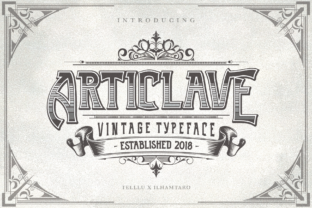
Articlave isn’t just another display font—it’s a carefully crafted typographic tool built for impact, personality, and versatility. Designed with a bold vintage sensibility, it balances strong character presence with surprising flexibility. Whether you’re designing a boutique café menu, launching a podcast brand, or crafting an event poster, Articlave delivers visual distinction without sacrificing legibility at larger sizes. Its three distinct styles—Regular, Inline, and Shadow—aren’t just cosmetic variants; they’re functional layers that let you build hierarchy, contrast, and depth in seconds—not hours.
Why people reach for Articlave (and why some hesitate)
Many designers and small business owners gravitate toward Articlave because it solves a real problem: standing out in crowded digital and physical spaces. Unlike overused script fonts or generic slab serifs, Articlave carries unmistakable presence while remaining approachable. Its vintage roots feel authentic—not retrofitted or gimmicky—and its generous x-height and open counters keep it readable even in tight layouts or on lower-resolution screens.
Yet hesitation often comes not from the font itself, but from assumptions about how to use it. Some assume “vintage” means “only for nostalgia projects.” Others worry it won’t pair well with modern sans-serifs or that it lacks language support. Neither is true—but those misconceptions can delay adoption or lead to underwhelming results.
A common mistake: Treating all three styles as interchangeable
Articlave’s Regular, Inline, and Shadow versions are intentionally designed to work *together*, not replace one another. Using only the Shadow style for body text—or applying the Inline version at tiny sizes—undermines its strengths. The Inline variant, for example, shines at medium-to-large sizes where its delicate line work creates texture and refinement. At 14px, though, it becomes indistinct and hard to read. Similarly, the Shadow style adds dimension best when there’s enough space around it; cramming it into narrow columns or stacked social media graphics can muddy contrast and reduce clarity.
Better approach: Reserve Inline for headlines or short quotes where subtlety matters. Use Shadow for emphasis—like a single word in a tagline—or layered over solid backgrounds. Keep Regular as your go-to for primary headings and banners. Test combinations in context: paste your actual headline into design software, apply each style at your intended size, and step back. If you can’t quickly identify the hierarchy or message, simplify.
Overlooking the vector ornaments (and missing easy polish)
The four bonus EPS ornaments included with Articlave aren’t afterthoughts—they’re intentional design accelerators. Each is clean, scalable, and stylistically aligned with the font’s era and energy. Yet many users download them, unzip the folder, and never open the files. That’s like buying a chef’s knife and never using the bolster for leverage.
These ornaments work especially well as dividers in newsletters, subtle background elements behind testimonials, or framing devices for logos and quotes. Because they’re vector-based (not raster), they scale infinitely—no pixelation when printed on a 4×6 ft banner or displayed on a mobile screen.
Practical tip: Before finalizing a layout, ask: “Where could a quiet visual echo reinforce the tone?” A single ornament beneath a headline, rotated 15° and set to 10% opacity, often adds more sophistication than extra type treatments ever could.
Misjudging file formats—and limiting compatibility
Articlave ships in OpenType (.otf) format, which works reliably across Adobe apps, Affinity Suite, Figma (via font linking), and most modern operating systems. But some users mistakenly assume it will load seamlessly in Canva or older versions of Microsoft Office—without checking first. While newer Canva versions support custom uploads, free-tier accounts restrict font usage to Canva’s library. And Word 2016 or earlier may not render the Inline or Shadow glyphs correctly, defaulting instead to fallback characters or blank spaces.
This isn’t a flaw in Articlave—it’s a workflow mismatch. Expecting universal compatibility without verifying platform support leads to last-minute redesigns, inconsistent branding, or embarrassing presentation glitches.
What to check before buying or installing:
- Your primary design tools—and their current version numbers
- Whether your client or team uses restricted platforms (e.g., shared Canva accounts, legacy CMS templates)
- If you need web embedding: Articlave is desktop-only by default. For websites, you’ll need a web-licensed version or a thoughtful fallback strategy (e.g., pairing a similar free font for body copy while serving Articlave only for key headings via @font-face)
Underestimating spacing—and losing impact
Vintage-inspired fonts like Articlave often benefit from slightly more generous letter-spacing (tracking) than contemporary typefaces. Too-tight settings flatten its rhythm; too-loose settings break cohesion. This is especially true with the Inline and Shadow styles, where optical balance depends on consistent air between characters.
A real-world example: A freelance designer used Articlave Shadow for a wedding invitation headline at 36pt but applied default tracking (-25). The result felt cramped and visually heavy—like the letters were leaning on each other. Adjusting to +40 tracking opened up the composition, letting the shadow detail breathe and improving overall elegance.
Simple test: Type your headline. Zoom to 100%. Cover the left half with your hand. Does the right side feel lighter or heavier? If so, adjust tracking in 5-unit increments until both halves feel balanced. Then step away for 10 seconds and look again.
Assuming “vintage” means “limited use”
Articlave’s aesthetic is rooted in mid-century signage and print, but its structure supports modern applications—from Shopify store banners to Instagram Story templates. The misconception that vintage fonts don’t translate digitally often leads creators to avoid them entirely—or worse, force them into contexts where their charm gets lost (e.g., long paragraphs, data tables, or dense UI labels).
That’s not a limitation of Articlave—it’s a matter of scope. Like choosing the right brush for a painting, matching the font’s intent to the job is what unlocks its value.
Try this instead: Use Articlave for moments that need memorability—logos, cover art, email subject lines, product names. Pair it with a neutral, highly legible sans-serif (like Inter, Poppins, or even system fonts like -apple-system) for supporting text. That contrast does the work for you: personality upfront, clarity everywhere else.
Final note: It’s about intention, not ornament
Articlave earns its place not because it’s decorative, but because it communicates clearly—with confidence and warmth. The biggest win isn’t finding a “cool font.” It’s recognizing when a project needs voice, not just visibility—and having a tool ready that delivers both, without compromise.